Skip to content
Stocks, options, forex and crypto

Your AI trading partner.

The journal that writes itself: connect your broker or exchange once and every closed trade comes in on its own. Mentor AI reads them, tells you what works for you and what is costing you money, and goes over your week with you.

$20 a month, everything included. No lock-in: pay for a month or a year in USDT. On your computer and on your phone.

mentortrader.ai/dashboard
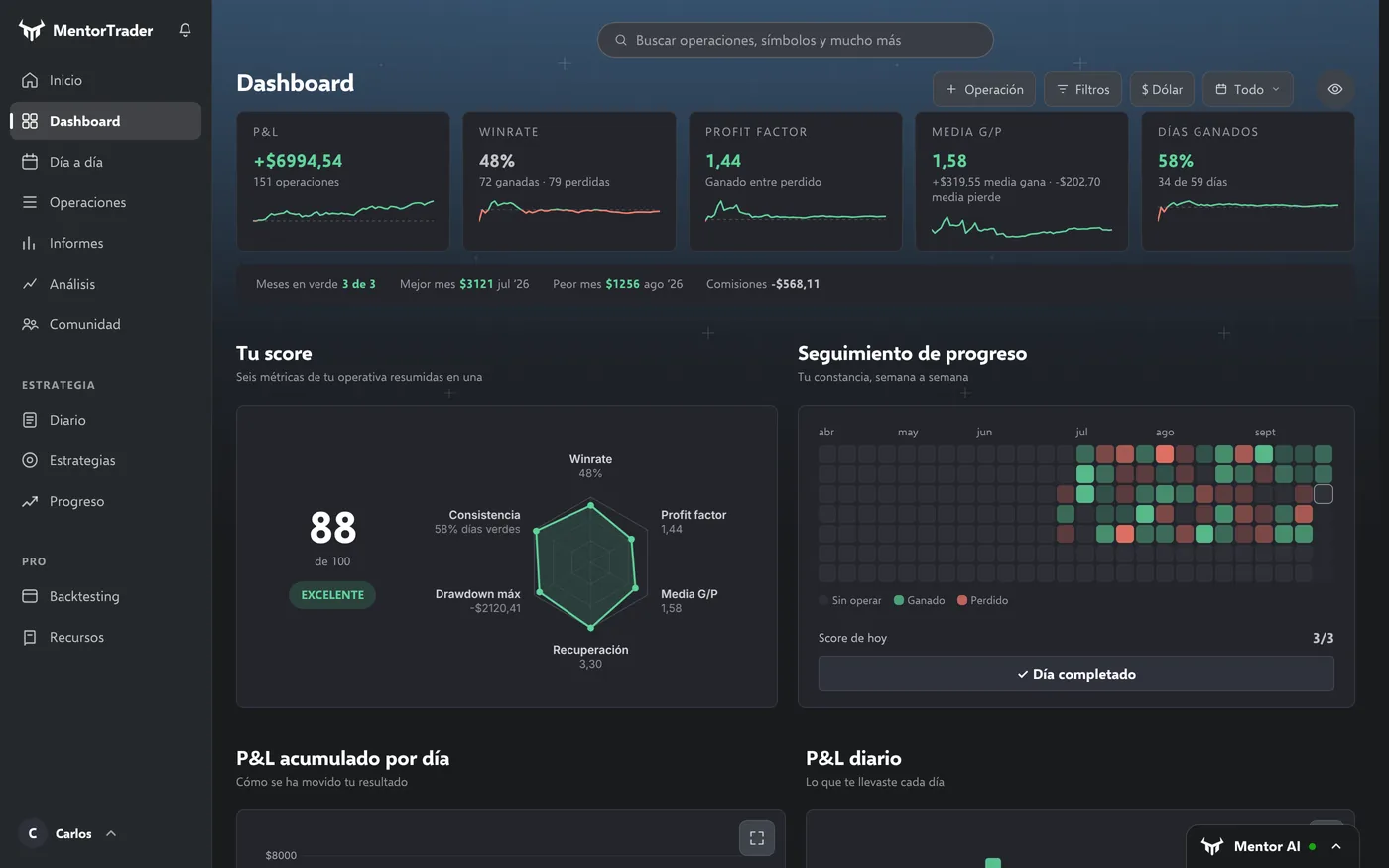
MentorTrader dashboard with demo data: a result of +$6,994.54 over 151 trades, win rate, profit factor, the score of 88 out of 100 with its six metrics and the consistency tracker.
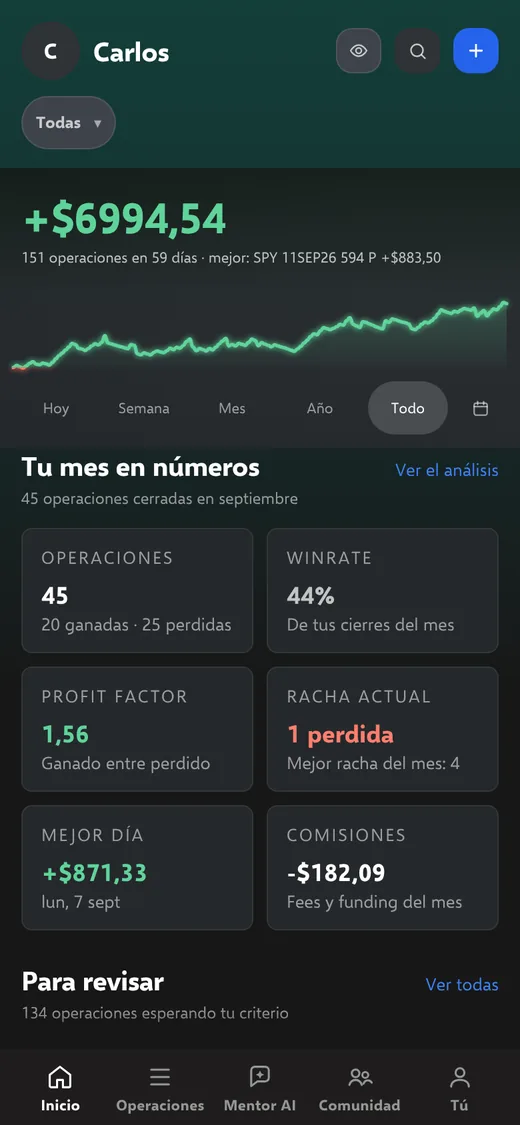
MentorTrader home on the phone: the cumulative result, its curve and the month in numbers (demo data).

MentorTrader in numbers

  • 300Mentor AI messages a month, included
  • $15a month paying yearly, everything included
  • 0permissions to trade or withdraw: read-only
  • 2languages: the whole app in English or Spanish

Syncs with your broker or exchange and opens every trade on TradingView charts. See which ones

How it works

Three steps and you forget the spreadsheet.

No templates, no typing. You trade; MentorTrader writes.

1

Connect your broker or exchange

Just once, with a read-only connection. The app has a guide for each platform, and your keys are stored encrypted on the server.

2

Trade as usual

Every closed trade comes in on its own, with its entry, exit, fees and funding. You add your strategy and your note.

3

Improve with Mentor AI

It reads your trades and tells you, with your own numbers, what works for you, what costs you money and how your week went.

Product

All your trading, in one place.

One app, one price. The screenshots are from the real app (in Spanish) with demo data: click them to see them full size.

Automatic journal

Every trade comes in on its own, with its chart.

You connect your platform once. From then on, every closed trade arrives with its entry, exit, fees, funding and duration, and opens its TradingView chart with the entry and exit marked. You only add your strategy, stop loss, take profit and note.

  • Several accounts connected at once
  • Your trades, exported to CSV whenever you want
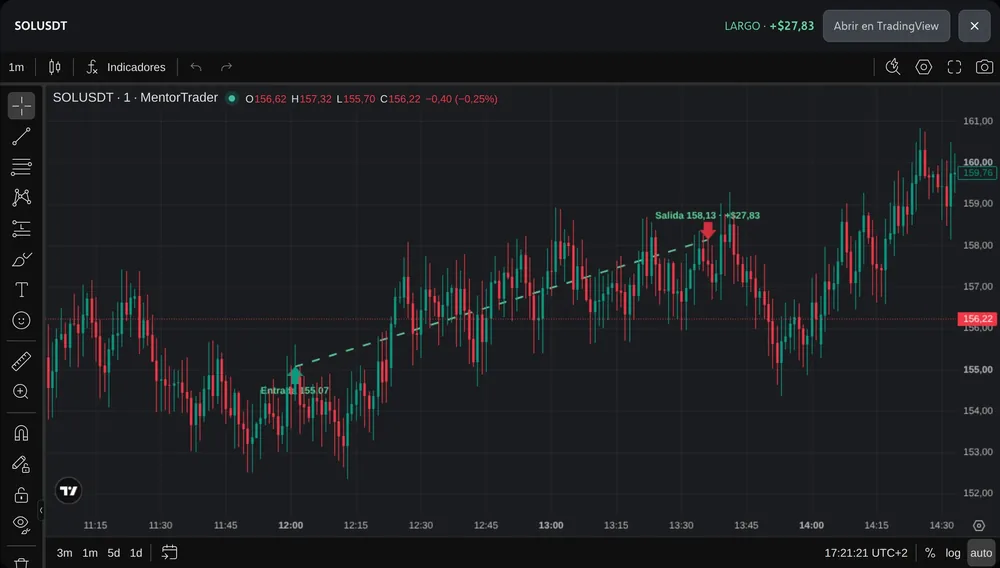
Trade page for a long trade on SOLUSDT, with its TradingView chart and the entry and exit marked on the candles.
Day by day

Every day, with its result and your note.

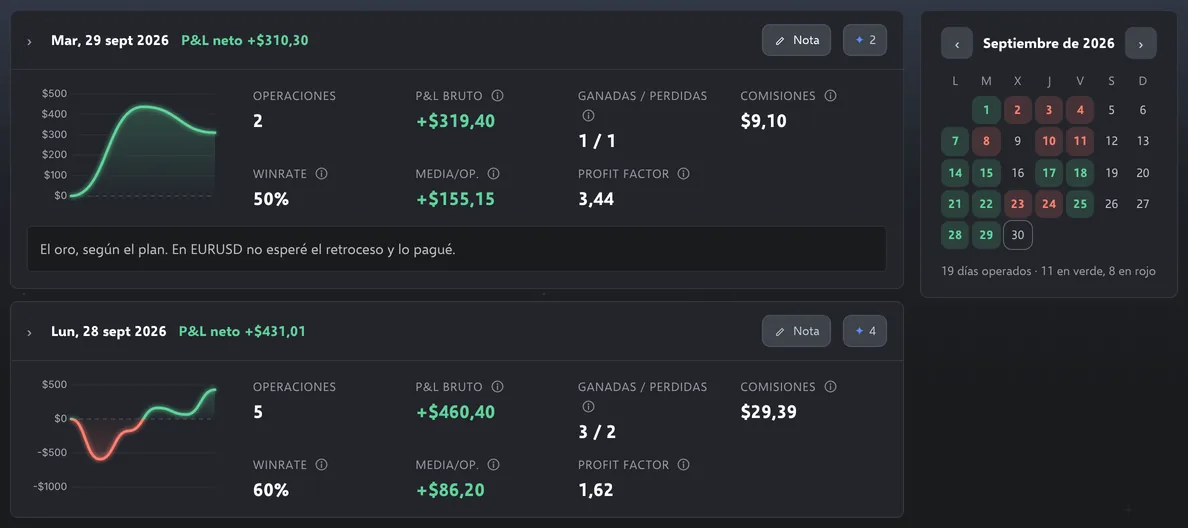
Day by day shows you each session’s curve, its trades and what you paid in fees, with a note that saves itself as you type.

  • Each session’s curve
  • The day’s win rate, profit factor and fees
  • The month calendar, in green and red
Day by day with demo data: two September sessions with their curve, trades, gross P&L, wins and losses, fees, win rate, profit factor and the day’s note; on the right, the month calendar.
Analysis

What works for you and what costs you money.

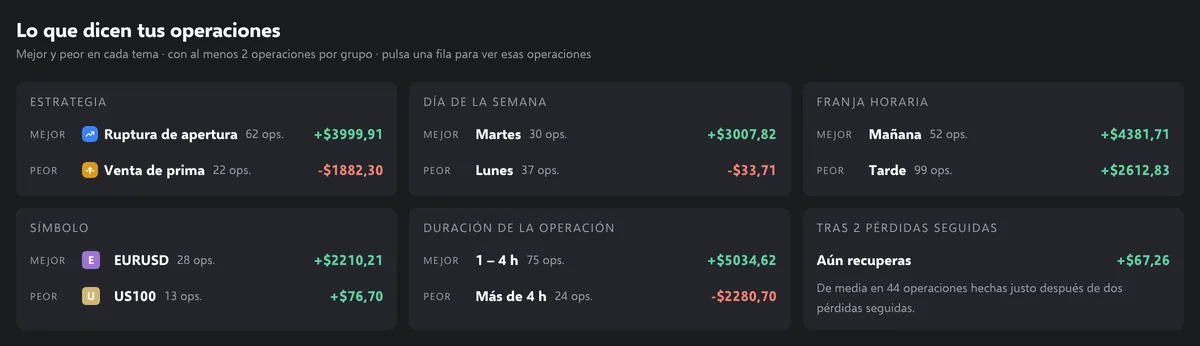
Analysis reads your closed trades and shows you the best and the worst for each topic: strategy, day of the week, time of day, symbol and duration. Also what happens after two losses in a row. Every row takes you to those trades.

What your trades say, with demo data: best and worst strategy (opening range breakout and premium selling), day of the week (Tuesday and Monday), time of day, symbol (EURUSD and US100), duration (over 4 hours, −$2,280.70) and the result after two losses in a row.
Strategies

Your rules, checked automatically.

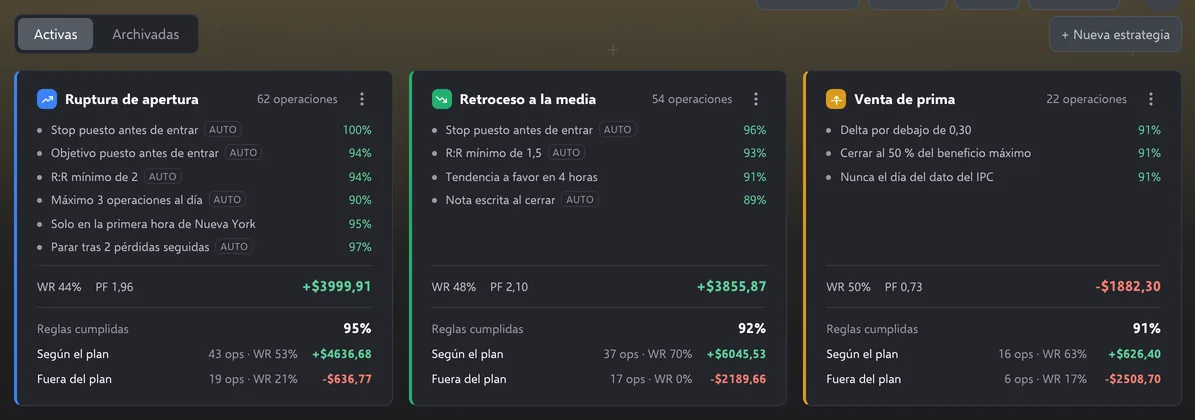
You write each strategy with its rules. The ones that can be measured (stop loss set, take profit set, minimum R:R, maximum trades per day, trading hours) are checked automatically on every trade; you tick the rest yourself. And you see what happens when you follow the plan and when you don’t.

Three strategies (opening range breakout, pullback to the moving average and premium selling) with their rules; the ones marked AUTO are checked automatically. Below each one, the rules followed and the result on plan and off plan.
Backtesting

Backtesting and replay on TradingView.

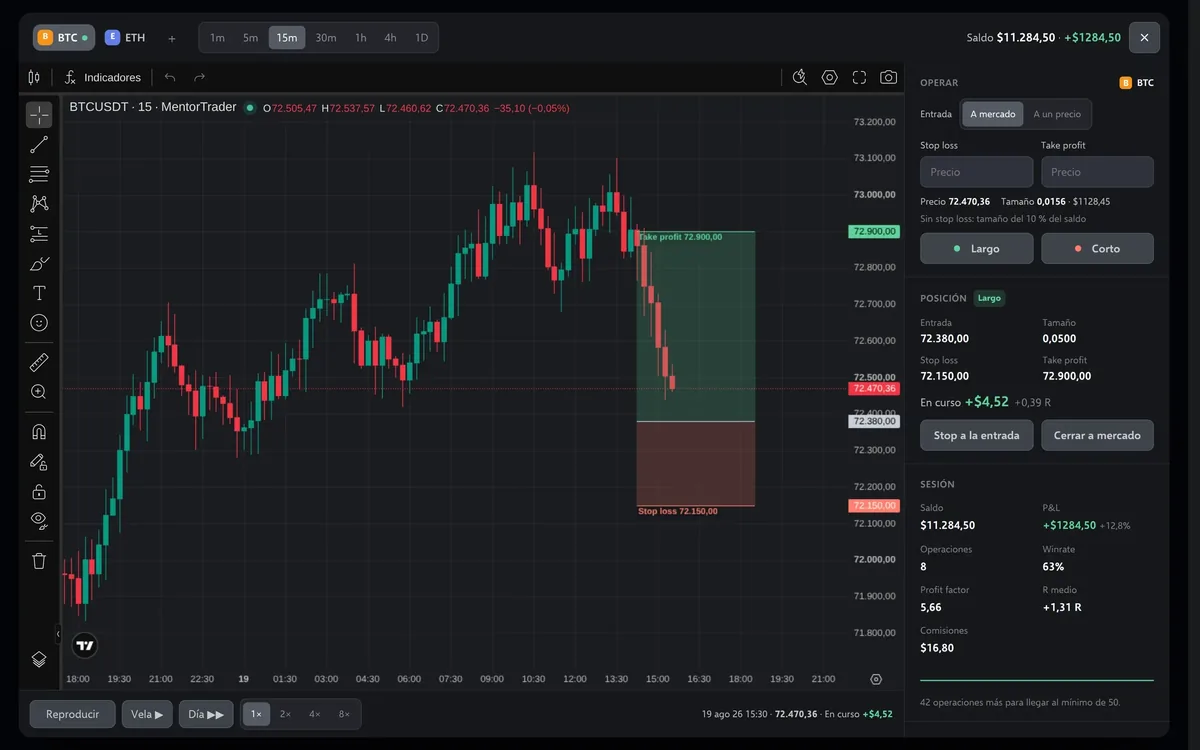
You replay the market candle by candle without seeing the future. You enter at market or at a price, drag the stop loss and take profit on the chart, and every session keeps its statistics. With replay you can watch any of your own trades again, candle by candle.

  • Several assets in the same session
  • Crypto, forex, indices, commodities and stocks
  • From the 1-minute chart to the daily
  • Sessions saved to your account
mentortrader.ai/backtesting
Backtesting on a 15-minute TradingView chart of BTCUSDT: a long position with stop loss and take profit marked, the trading panel and the session statistics.
Community

Share a trade, if you want.

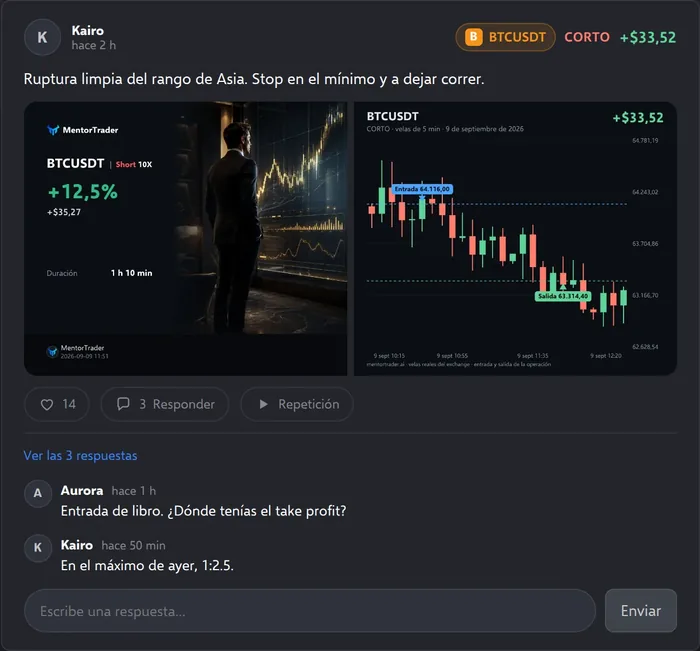
In the community you post a trade with its card and its chart, and you choose what is shown: you can show the chart without showing the money. Others reply and leave their likes.

  • You choose which data is shown
  • Card, chart and trade replay
  • Replies and likes
Community post: a short trade on BTCUSDT with its card, its chart, likes and replies.
Journal

Trade, day, week and month notes.

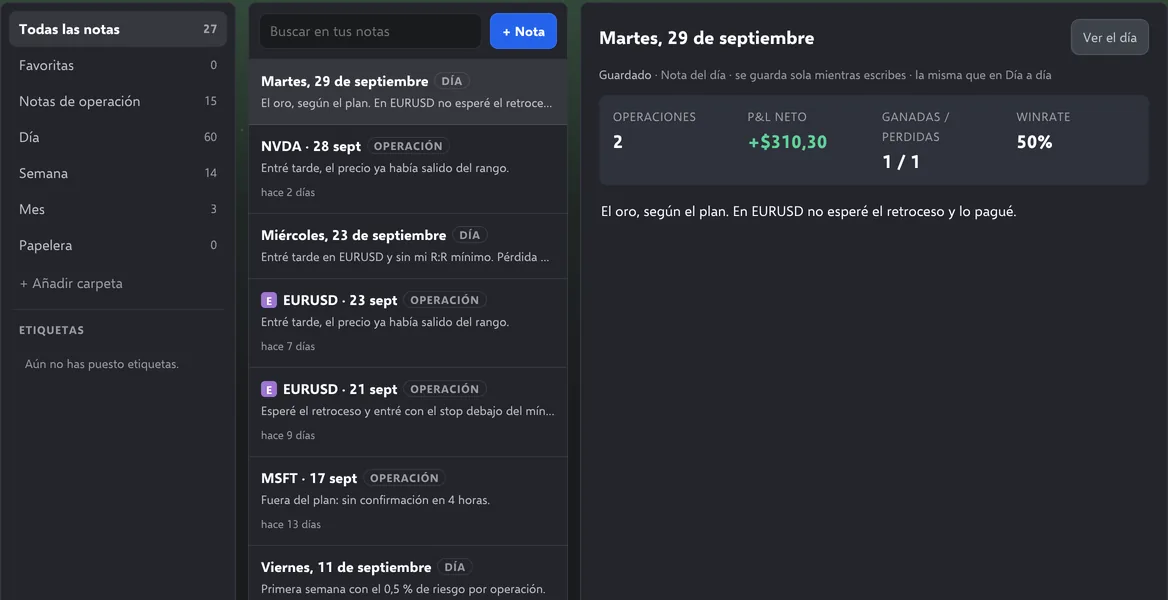
With images, folders and tags. Every note is linked to the trade or the day it belongs to, and the day note is the same one you write in Day by day.

The journal with demo data: folders on the left, the list of day and trade notes in the middle and, on the right, the note for Tuesday 29 September with that day’s numbers.
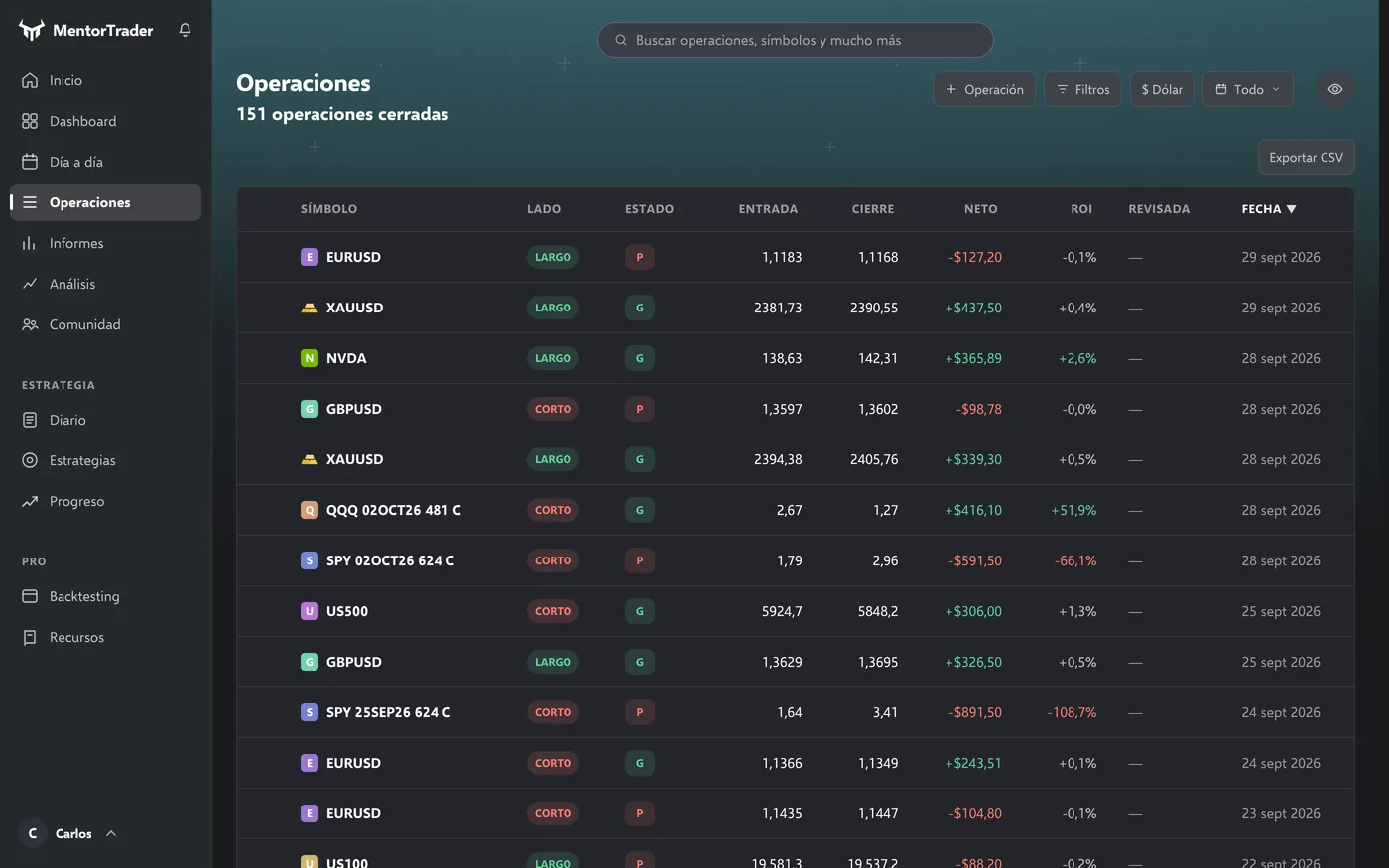
mentortrader.ai/operaciones
Trades with demo data: the table with the symbol, side, entry, close, net result, ROI, whether it has been reviewed and the date.

All your trades, in one table.

Search them, filter them, mark the ones you have reviewed and export them to CSV.

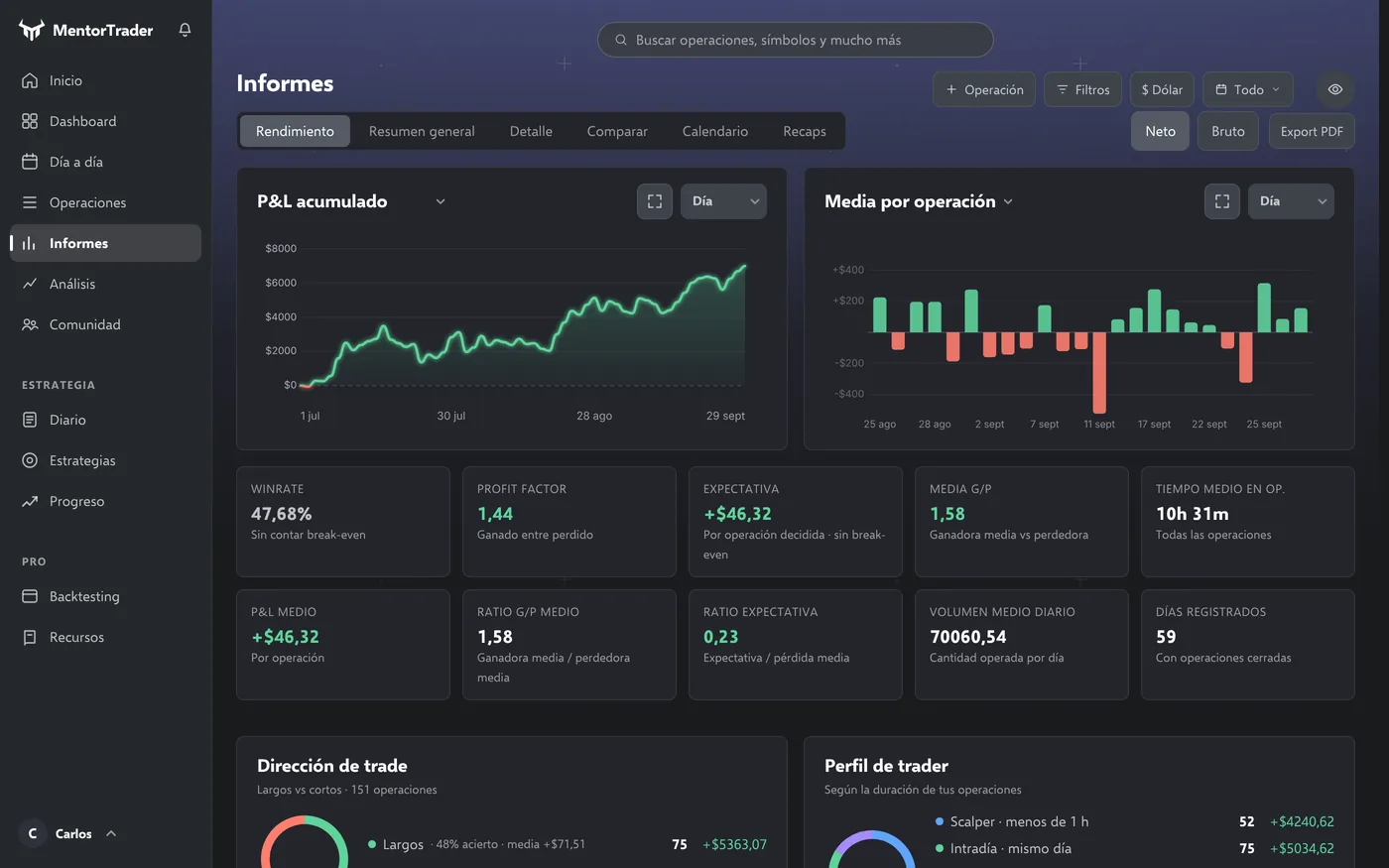
mentortrader.ai/informes
Reports with demo data: cumulative P&L, average per trade and the period’s metrics.

Find your edge in the data.

The dashboard sums up your trading in a score from 0 to 100 built from six metrics. Reports compares periods and exports to PDF.

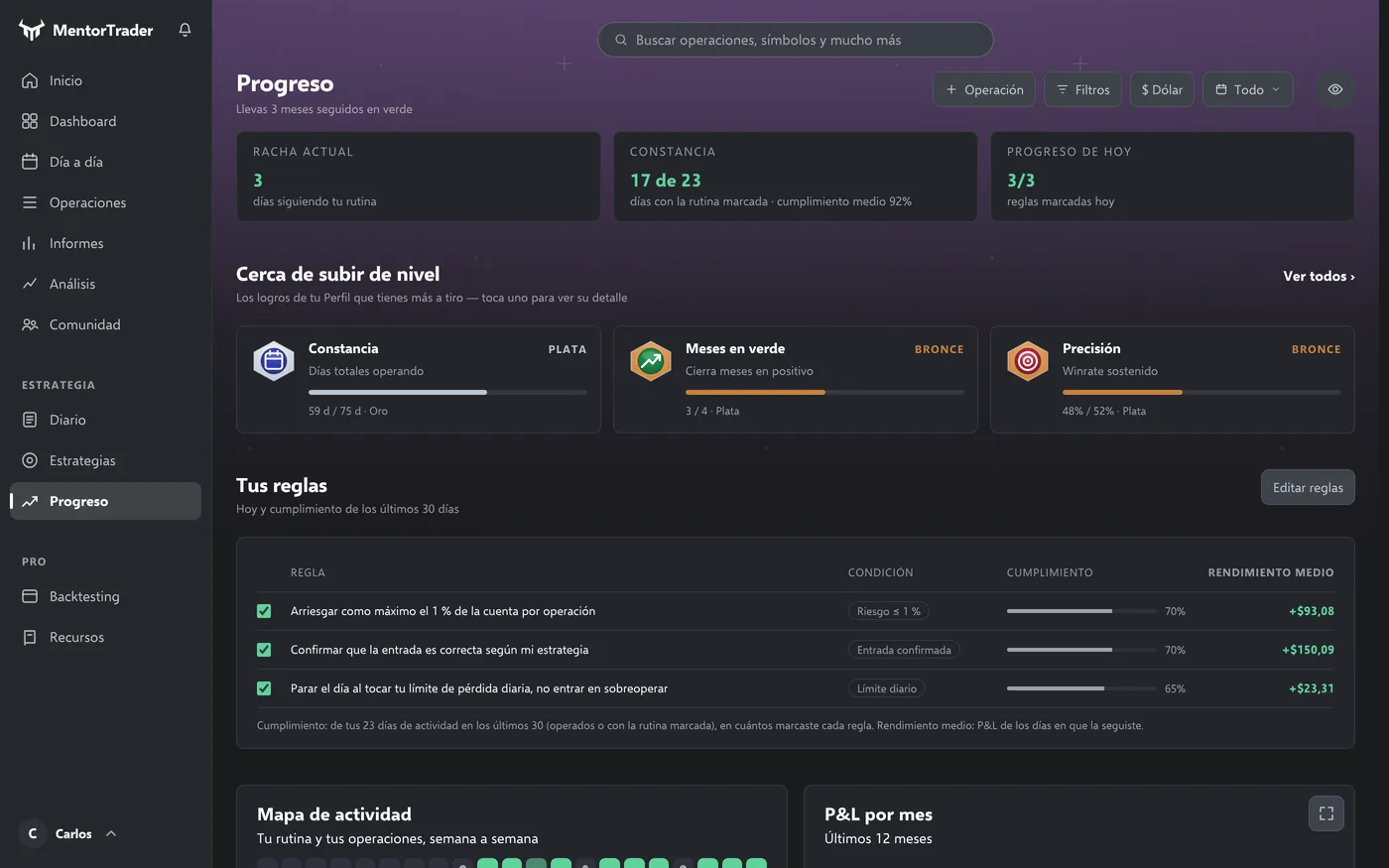
mentortrader.ai/progreso
Progress with demo data: the streak, consistency, the achievements closest to levelling up and how often you follow your rules.

Your consistency, week by week.

Your daily routine, your discipline rules and how often you follow them, the activity map and the month’s goals.

Mentor AI

A mentor that knows your trades.

Mentor AI reads your journal and answers with your own numbers, at any hour. It doesn’t tell you what to buy or sell: it helps you see how you trade and what to change.

Ask it

It answers with your data, not with forum tips.

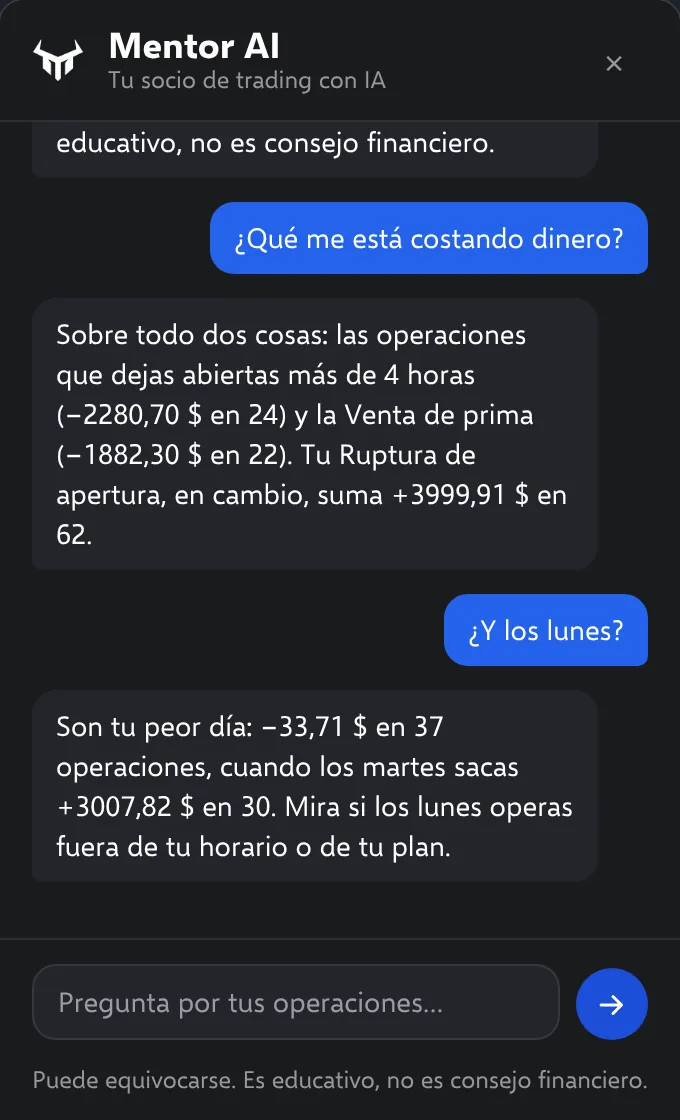
Ask it what is costing you money, which day of the week is your worst or what you do after two losses in a row. It answers with your trades in front of it.

  • Patterns you can’t see at a glance: what hides among hundreds of trades, with its number.
  • Guided mode: unsure before you enter? It walks you through short questions: context, stop, risk, ratio and whether the idea fits your plan.
  • Included in your plan: up to 300 messages a month on both plans, at no extra cost.
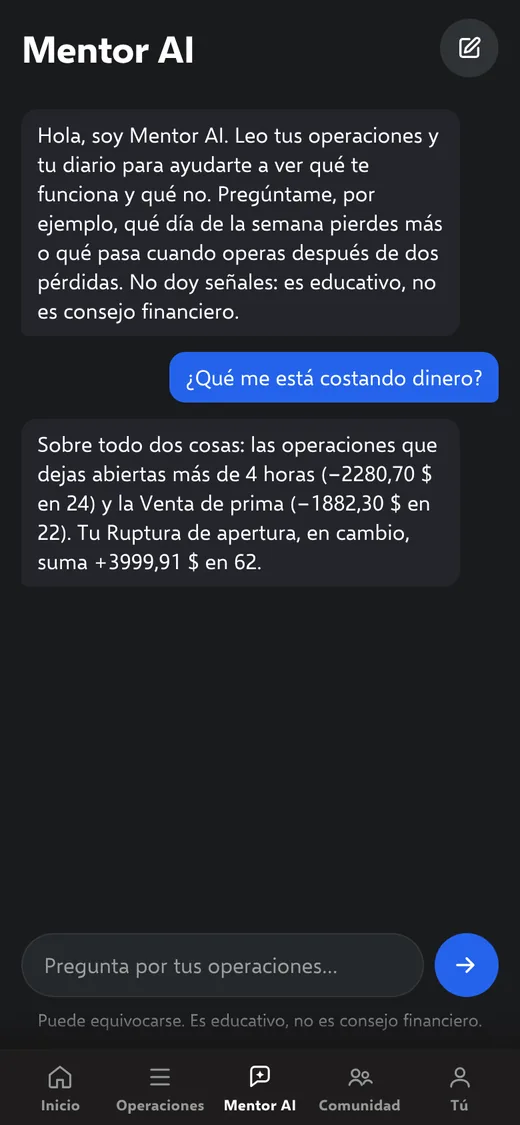
Demo conversation with Mentor AI (in Spanish). What is costing me money? The trades kept open for more than 4 hours (−$2,280.70 over 24) and premium selling (−$1,882.30 over 22); the opening range breakout adds up to +$3,999.91 over 62. And Mondays? Your worst day: −$33.71 over 37 trades, while on Tuesdays you make +$3,007.82 over 30.
Weekly review

Every week, your grade from A+ to F.

Once a week, with your numbers: what you did well, what to change and a grade that rates the process, not the money.

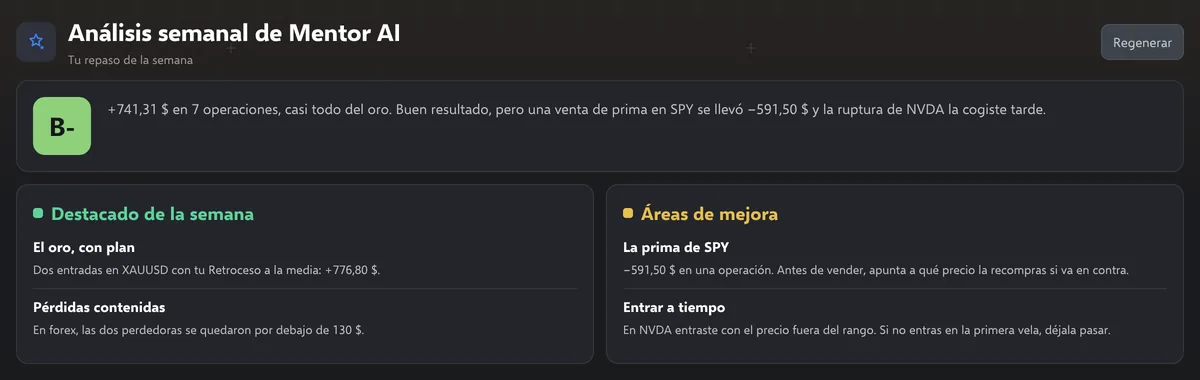
Mentor AI weekly review with demo data (in Spanish): grade B-, the week’s summary (+$741.31 over 7 trades), the highlights and what to improve.

Demo conversation and figures. Mentor AI only reads your own account’s data. It can make mistakes and it is not financial advice: the decisions are yours.

Mobile

Just as complete on your phone.

MentorTrader opens in your phone’s browser and installs on your home screen like an app. Same journal, same analysis, same notes and the same Mentor AI.

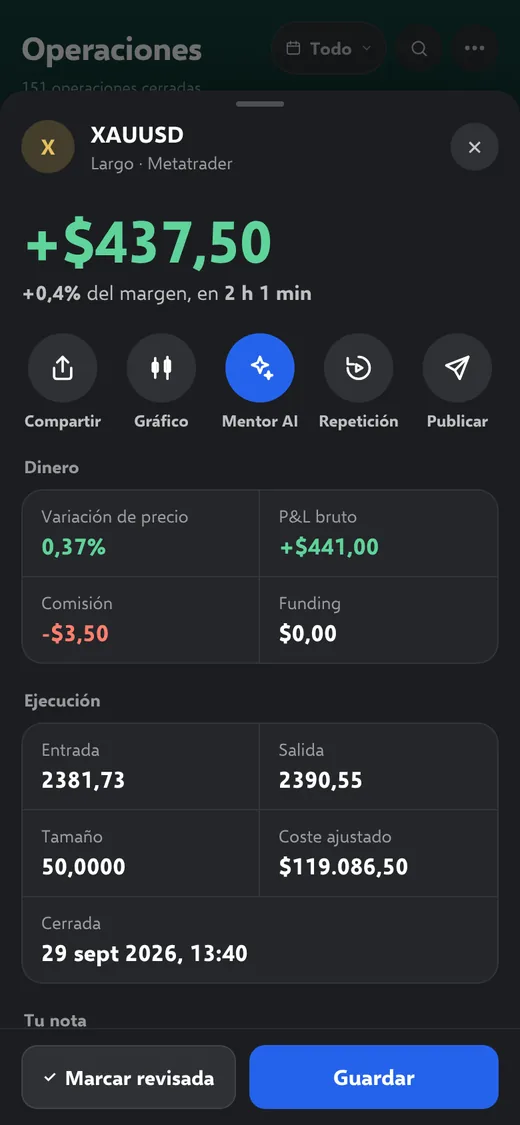
A trade on the phone: XAUUSD long, +$437.50, with Share, Chart, Mentor AI, Replay and Post, and its data in cards (demo data).
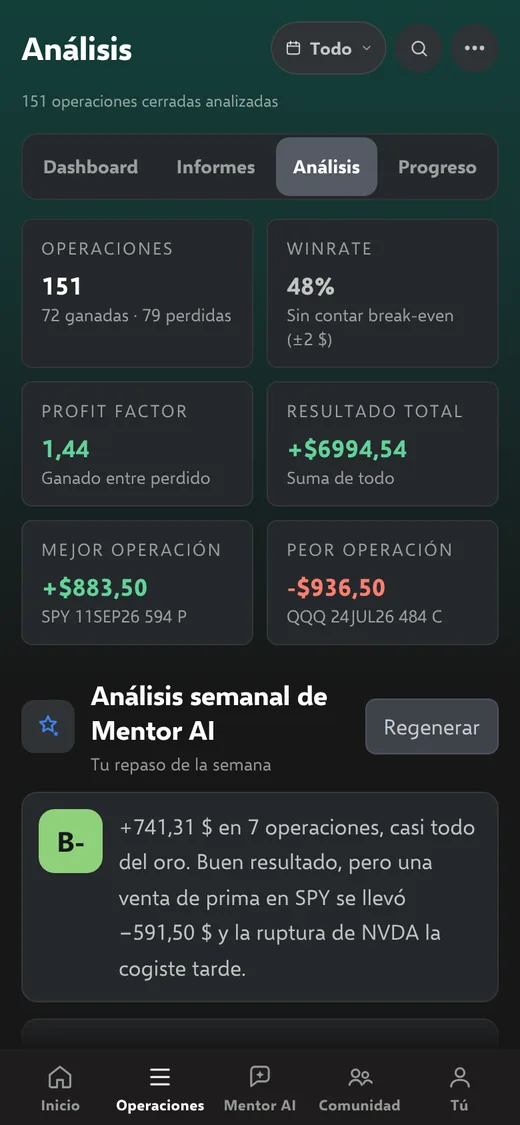
Analysis on the phone: the period’s metrics and the Mentor AI weekly review with its grade (demo data).
Mentor AI on the phone: it answers what is costing you money with the numbers from your trades (demo conversation).
Your data

Read-only. And only for you.

It can’t touch your money

Every connection is read-only: MentorTrader reads your closed trades and nothing else. It can’t trade, withdraw or move your funds.

Your keys, encrypted

The keys you connect your broker or exchange with travel to the server and are stored encrypted. They don’t stay in your browser.

Only you see your trades

Only what you post shows up in the community, and when you post you choose what is shown. Mentor AI only reads your own account’s data.

Your data goes with you

Export your trades to CSV whenever you want, and if you disconnect a platform, its key is deleted.

You set the criteria

Not another signal. Your own method.

MentorTrader does not trade for you or tell you what to buy. It is where you log, analyze and practice your own way of trading. The community and Mentor AI come along; the judgement is yours.

  • No signals, no financial advice
  • Read-only connection: it can never trade or withdraw
  • Only you see your trades and your notes
Comparison

MentorTrader vs TradeZella.

With both, your trades come in on their own and you have an AI assistant that reads your data. Here is what changes.

What is comparedMentorTradereither planTradeZella Essentialtheir cheapest plan
Paying yearly$15 a month ($180)$26 a month ($315)
Month to month$20$35
Connected accountsSeveral at once1 active
AI assistantMentor AI, up to 300 messages a monthZella AI, 500 credits a month
BacktestingIncludedUp to 10 strategies
Trade replayIncludedNot included

TradeZella figures are from their pricing page (tradezella.com/pricing), checked on 7 October 2026.

Pricing

One price. Everything included.

No tiers and no paid add-ons: Mentor AI is included.

Monthly

$20 a month
Pay for a month and decide whether to continue.
  • Automatic journal with several accounts at once
  • Mentor AI: up to 300 messages a month
  • Weekly review with a grade
  • Day by day, trades, notes and reports
  • Analysis of what works for you
  • Strategies with rules that are checked automatically
  • Backtesting and replay on TradingView
  • Community
  • Web app for your phone, in English or Spanish
Create account
Best price

Yearly

$180 a year
Works out at $15 a month: you save $60.
  • Automatic journal with several accounts at once
  • Mentor AI: up to 300 messages a month
  • Weekly review with a grade
  • Day by day, trades, notes and reports
  • Analysis of what works for you
  • Strategies with rules that are checked automatically
  • Backtesting and replay on TradingView
  • Community
  • Web app for your phone, in English or Spanish
Create account

You pay in USDT, inside the app. No automatic renewal: you pay for a month or a year and, when it ends, you decide whether to continue.

FAQ

What people ask before signing up.

Which platforms does it work with?

With Interactive Brokers (stocks and options), with MetaTrader 5 from any broker (forex and CFDs) and with the Bitunix and WEEX exchanges (crypto futures). From MetaTrader 4 you can upload the HTML statement.

How is it different from TradeZella?

With both, your trades come in on their own and you have an AI assistant that reads your data. What MentorTrader gives you on top: it costs $20 a month with everything included and no tiers, connects several accounts at once, checks your strategy rules automatically and includes backtesting and trade replay on TradingView. It also works in Spanish.

Is Mentor AI included?

Yes, on both plans: up to 300 messages a month (100 a day), at no extra cost.

What does Mentor AI read about me?

A summary of your closed trades from the last 90 days and of what you write down in your journal (each trade’s strategy, tags and rating). Only from your account and only to answer you.

Does Mentor AI tell me what to trade?

No. Mentor AI is educational: it goes over your numbers and helps you think through your risk and your method, but it doesn’t tell you what to buy or sell and it doesn’t give financial advice. It can make mistakes, and the decisions are yours.

Do trades come in instantly?

MetaTrader 5 trades arrive while MetaTrader is open, and Bitunix and WEEX trades throughout the day. Interactive Brokers prepares its report once a day, overnight: what you close today shows up tomorrow.

Do I need MetaTrader on my computer?

For trades to come in on their own, yes: the MentorTrader file works in desktop MetaTrader (Windows or Mac), not in the mobile app or the web version. Otherwise, you can upload the HTML statement whenever you want.

Can MentorTrader trade or move my money?

No. Every connection is read-only: it reads your closed trades and nothing else. It can’t open trades, withdraw or move your funds.

Who can see my trades?

Only you. The community only shows what you post, and when you post you choose which data is shown.

How do I pay?

In USDT (dollars in crypto), inside the app: from any wallet over the Tron network (TRC-20) or, if you have a Bitunix account, by internal transfer, which arrives instantly. Once the payment is confirmed, your access switches on by itself.

You pay for a month ($20) or a year ($180) and there is no automatic renewal: when the period ends, you decide whether to pay for another.

Is there a trial period?

No. Here you can see the app as it is, with real screenshots. To try it with your own trades you pay for one month: it doesn’t renew on its own, so if you’re not convinced, you simply don’t pay again.

How long does it take to get started?

Creating your account takes a minute. To connect your platform, the app has a guide for each one, and once it’s connected your closed trades come in on their own.

What happens if I don’t pay again?

When you sign in, the app asks you to renew to continue. Your trades, notes and strategies stay saved: when you pay again, everything is as you left it.

Does it work on my phone?

Yes. It’s a web app: open it in your phone’s browser and add it to your home screen to open it like any other app.

Is it in English?

Yes: menus, analysis, reports and Mentor AI. If you prefer, you can also use it in Spanish.

Stop filling in your journal by hand.

Create your account in a minute, connect your broker or exchange and let the journal write itself.

$20 a month or $180 a year, in USDT. Mentor AI included.